How to diagnose Cloudflare Access failures in native apps
gist Separate tunnel errors from Access login, check the client's documented authentication support, then choose a compatible connection path.
You stopped about in. Jump back
contents
If a site behind Cloudflare Access opens in a browser but its native app cannot connect, check how the app authenticates. Access logs a browser in with a CF_Authorization cookie on the protected domain, so a working browser login does not show that a separate app sends the credentials Access expects. Check the client’s documented support or a supported device authentication method.
I run Audiobookshelf and cloudflared on my Unraid box.
Step 1: Separate the tunnel from Access
Check three things separately: the tunnel connection, Access authentication, and application login.
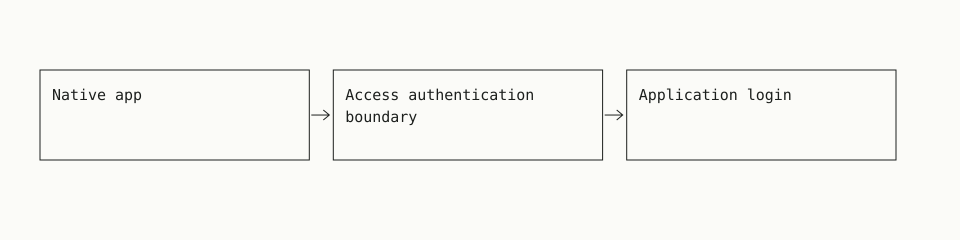
Cloudflare documents Access as a check that happens before requests reach the application. From that request order, an Access login page alone is not evidence that the application is reachable. Complete the browser login and check what appears next. Cloudflare application types.
Use the result to choose the next check:
| Result | What to check |
|---|---|
| Access login page or Access denial | Access policy and the client’s authentication support. |
Error 1033 |
Tunnel connector health and its connection to Cloudflare. |
Tunnel 502 with “Unable to reach the origin service” |
The route from cloudflared to the configured application service. |
| Application login page loads | Application credentials and the native client’s compatibility. |
These error meanings come from Cloudflare’s documentation. Error 1033 means Cloudflare cannot find a healthy cloudflared instance to receive traffic. The specific tunnel 502 above means the tunnel is connected, but cloudflared cannot reach the origin in its ingress rule. Other 502 responses need their own diagnosis. Tunnel troubleshooting.
If the app works through a trusted local connection, compare that result with the protected URL. A local success narrows the checks, but does not identify which remote layer failed. Keep Access enabled while collecting that evidence.
Step 2: Check what the client can authenticate
Read the documentation for the exact client and version. Look for explicit support for:
- Cloudflare Access login and session cookies.
- Custom HTTP headers on every required request.
- The application’s password or OpenID Connect login.
- A private VPN connection or supported device authentication.
Do not assume a field called “token” accepts Cloudflare credentials. Match the field’s documented purpose to the authentication method.
Cloudflare’s standard service-token method sends two headers: CF-Access-Client-Id and CF-Access-Client-Secret. The Access policy must accept the token with Service Auth. Cloudflare also documents a configurable single-header format. Use it only if the client supports that exact format. Cloudflare service token documentation.
For Audiobookshelf, the OpenID Connect documentation describes application login through an identity provider. It includes mobile redirect URIs. It does not document those redirects as a Cloudflare Access integration. The two documented flows serve different authentication checks, so Audiobookshelf OIDC support alone is not evidence that the client can pass Access. Audiobookshelf OpenID Connect documentation and Cloudflare authorization cookie documentation.
If the client supports custom headers, check their scope. Test login, playback, downloads, and reconnects. Do not stop after the initial server check succeeds. Keep service-token secrets out of screenshots and shared logs.
Step 3: Choose a supported connection path
Choose the path that fits the client’s documented support and the device you use.
| Connection path | When it fits | Tradeoff |
|---|---|---|
| Private VPN access | The client works locally and the device can reach the service through a VPN. | Requires a VPN connection, routing, and network permissions. |
| Application-supported authentication over HTTPS | The client supports the application’s login. | A public endpoint needs suitable application security and maintenance. |
| Cloudflare One Client authentication | The device is enrolled and the Access application supports device sessions. | Requires device setup and compatible Access settings. |
| Access service token | The client supports Cloudflare’s required header format. | Requires secure secret storage, rotation, and revocation. |
Audiobookshelf’s remote-access FAQ documents a VPN or reverse proxy as options. A VPN provides a private network path. A reverse proxy can provide HTTPS, but its login requirements still need to match the client. Audiobookshelf remote-access FAQ.
Cloudflare documents Authenticate with Cloudflare One Client as a beta option that uses an enrolled device’s session. It supports Access applications protected by Allow or Block policies. It does not work when Binding Cookie is enabled. Check these requirements before choosing this path; simply installing a client does not establish enrollment or compatibility. Cloudflare client-session documentation.
Tunnel ingress configuration handles routing. This illustrative fragment maps an example hostname to a controlled local demo upstream:
ingress:
  - hostname: app.example.com
    service: http://127.0.0.1:8080
  - service: http_status:404
It’s only the routing part, with no Access policy in it. Cloudflare requires a final catch-all ingress rule, which returns 404 here. Tunnel configuration documentation.
Check that the upstream address is reachable from cloudflared’s own network environment. The example loopback address refers to that environment, which may differ from the host when cloudflared runs in a container.
Before relying on a path, test application login, playback, downloads, and reconnection after session expiry. Keep the application’s own authentication enabled.
Common questions
What is the best way to set this up so the app can successfully connect to my service?
If the client works locally but has no documented Access support, private VPN access is a practical starting point. For an enrolled device, check Cloudflare One Client authentication against its documented limits. Use service tokens only when the client supports the required headers.
Can Audiobookshelf do the authentication before trying to connect?
Its documented mobile OIDC flow handles Audiobookshelf login. That does not establish support for Cloudflare Access authentication. Check both systems separately. If the client cannot send what Access requires, choose a supported device authentication method or private network path. Audiobookshelf OIDC documentation.
Why does it say “Failed to ping server” when the website works?
The message alone does not identify the cause. An Access response is one possibility; a routing or application error is another. Check the response status and whether the request reaches Audiobookshelf. Avoid sharing cookies, authorization headers, or tokens while inspecting the response.
Can I make it work without enabling a VPN or WARP each time?
Possibly, if the client supports the endpoint’s authentication method or the device maintains a compatible connection. Check the client’s documentation and device connection settings. A successful browser login alone does not verify either option.
Should I bypass Access for the API paths?
Do not use a bypass as the default compatibility fix. Cloudflare documents that Bypass disables Access security controls and request logging for matching traffic. Any route you bypass must be safe under the application’s own controls. A bypass also cannot use identity selectors such as email to identify who may skip Access. Cloudflare Access policy documentation.
Browse the Cloudflare guides and the full guide index for more setup help.
../cloudflare/ every Cloudflare guide