CrystalDiskMark and CrystalDiskInfo for Mac: oDisk does both
The Crystal tools are Windows-only. oDisk, my Mac app, runs the same four speed tests and reads the SSD health log. Free download.
You stopped about in. Jump back
Yes: oDisk is a Mac app that does both jobs. The Crystal tools only run on Windows, so I built one Mac app that runs the same four CrystalDiskMark speed tests and shows your SSD’s health the way CrystalDiskInfo does. oDisk isn’t affiliated with Crystal Dew World.
Download oDisk free. It needs macOS 15 or later, runs on Apple Silicon and Intel Macs, and is notarized by Apple. oDisk is sandboxed, doesn’t connect to the internet, and its source code is on GitHub.
Quick answers
Is CrystalDiskMark available for macOS?
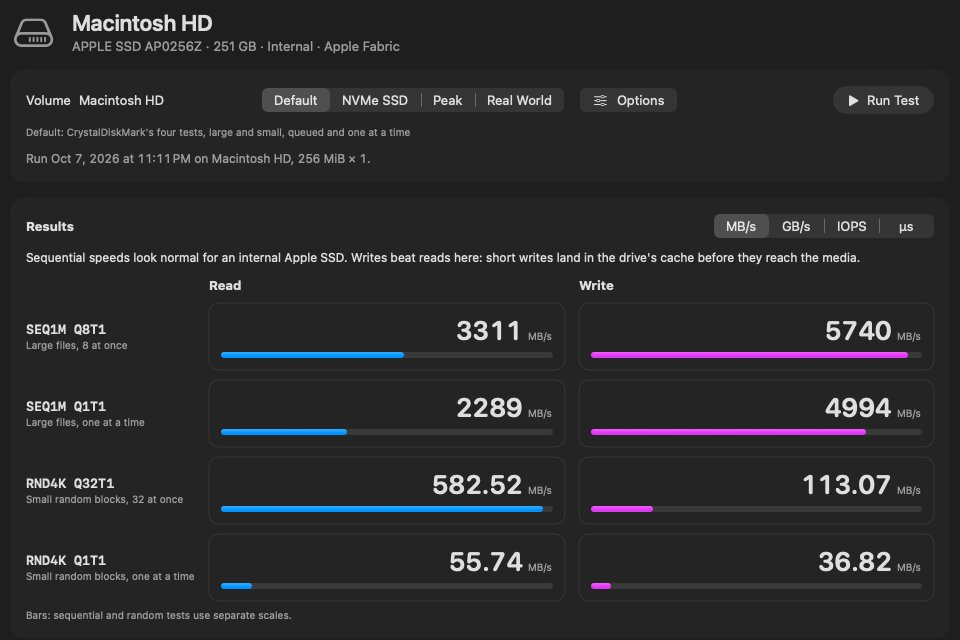
Not the Windows program itself, but oDisk gives Mac users the same thing: the four standard tests (SEQ1M Q8T1, SEQ1M Q1T1, RND4K Q32T1, RND4K Q1T1) in the same read/write grid, plus the extra test sets in the table below. The layout and test names match, so you can compare your results with the CrystalDiskMark screenshots people post from Windows.
Is CrystalDiskInfo available for macOS?
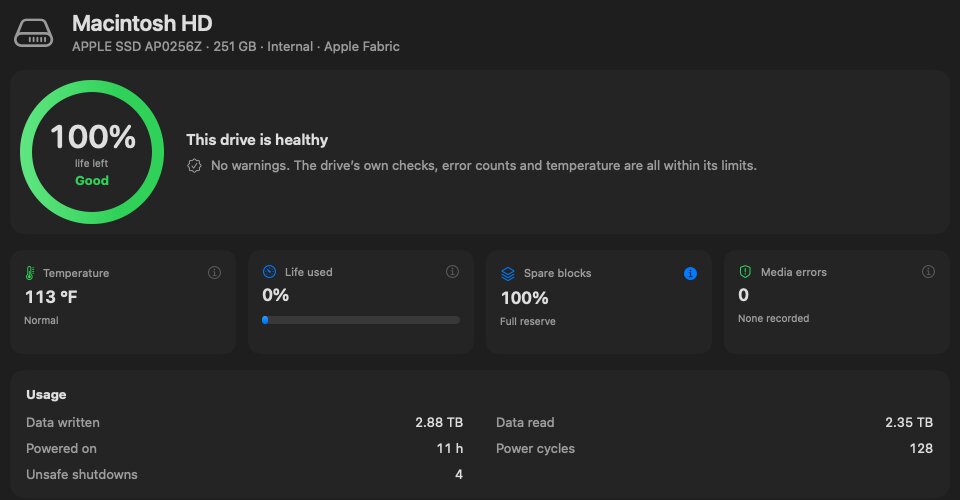
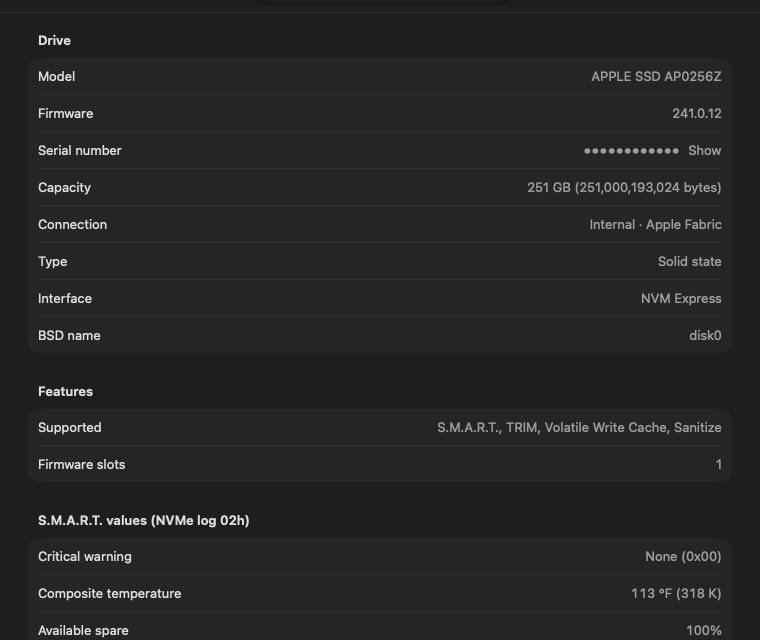
Not the Windows program, but oDisk reads the same S.M.A.R.T. health data on a Mac: a Good / Caution / Bad verdict with the reason, life used, spare blocks, temperature, data written, power-on hours, unsafe shutdowns and media errors. Each number comes with a plain explanation.
Is oDisk free?
Yes, the download from orgista.com is free for now and includes every health reading. A Mac App Store version is also coming; Apple’s App Store sandbox lets it read only a few health values, so it’s mainly the speed test.
Can I run the Windows versions in Parallels or with Wine?
They may start, but the results won’t describe your Mac’s drive. Inside a virtual machine, CrystalDiskMark measures a virtual disk file going through the VM’s cache, and CrystalDiskInfo can’t see the real drive’s health log. To measure your Mac’s actual drive, run the test natively on macOS.
Does macOS have anything built in?
Only a pass/fail summary. In Disk Utility, select the physical drive (the top line, not the volume) and look for “S.M.A.R.T. status: Verified”. That tells you only that the drive hasn’t raised its own failure flag. It doesn’t show any of the numbers.
Can a Mac read the health of an external SSD, like a Samsung T7?
Often, yes. macOS passes the NVMe health log through many USB-to-NVMe enclosures, and oDisk reads it without installing a driver or kernel extension. Older SATA-in-USB enclosures often block it.
What oDisk does
| On Windows you used | In oDisk on the Mac |
|---|---|
| CrystalDiskMark’s four tests and results grid | The same four tests and grid, plus NVMe SSD, Peak and Real World sets, mix and 0Fill, in MB/s, GB/s, IOPS or latency |
| CrystalDiskMark’s screenshot for forums | Copy or save the results as an image, or copy them as text |
| CrystalDiskInfo’s health status box | A health ring with Good / Caution / Bad and the reason in one sentence |
| CrystalDiskInfo’s attribute list | Every raw value in Details, with an explanation behind each number |
| Nothing | A sustained write test that shows where an external SSD slows down and how hot it got |
| Nothing | Run history per drive, with “this run vs last run” comparisons |
Real results
The four standard tests on the internal SSD of an M4 Mac mini (256 GB, macOS 27), with a 1 GiB test file, in MB/s:
| Test | Read | Write |
|---|---|---|
| SEQ1M Q8T1 | 3,104 | 1,810 |
| SEQ1M Q1T1 | 2,121 | 1,759 |
| RND4K Q32T1 | 544 | 81 |
| RND4K Q1T1 | 55 | 28 |
Base-capacity Macs are at the low end for writes; larger internal SSDs are faster. With a small test file, writes can look much faster than this because they land in the drive’s cache first, which is why a 1 GiB file is the default.
Other Mac options
If you only need part of the job, these also work:
| Tool | Cost | What it does |
|---|---|---|
| AmorphousDiskMark | Free | CrystalDiskMark-style speed test only; no drive health. |
| Blackmagic Disk Speed Test | Free | Large-file read and write for video work; no random 4K tests, no health. |
| DriveDx | Paid | Drive health only; some external drives need its separate driver. |
| smartctl (smartmontools) | Free | Command-line health readout: brew install smartmontools, then smartctl -a disk0. Raw numbers, no explanations. |
If you want both in one window, that’s what oDisk is for.
Reading the results
- SEQ1M Q8T1: large files, 8 requests at once. The number on the box.
- SEQ1M Q1T1: large files, one at a time.
- RND4K Q32T1: small random blocks, 32 at once.
- RND4K Q1T1: small random blocks, one at a time. This one is closest to how the drive feels day to day.
More in how to test SSD speed on a Mac and what the SSD health numbers mean.
Get oDisk
oDisk is a free download for now: download oDisk free. Open the DMG and drag oDisk to Applications. It’s signed and notarized by Apple, and the source code is on GitHub.
../mac/ every Mac guide