How to Test SSD Speed on a Mac (CrystalDiskMark-Style) and Read the Results
gist Use a 1 GiB file, run it twice, then read SEQ1M Q8T1 for the box number and RND4K Q1T1 for how snappy the drive feels.
You stopped about in. Jump back
contents
A disk speed test writes a test file, reads it back, and reports how fast that went. Whatever tool you use, run it the same way every time and know which number to look at.
Run the test
These steps use oDisk, my CrystalDiskMark-style test and health app for Mac, which is a free download for now. AmorphousDiskMark runs the same four tests (SEQ1M Q8T1, SEQ1M Q1T1, RND4K Q32T1 and RND4K Q1T1) if you only need the speed numbers. Either way, your results compare with what people post from Windows. The screenshots below come from quick test runs (a 256 MiB file, one pass), so their write speeds are higher than a full 1 GiB test gives.
Step 1: Open the Speed Test
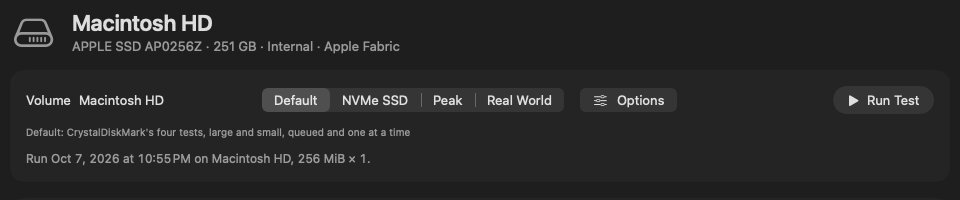
Select the drive in the sidebar, then choose Speed Test at the top. Leave the test set on Default: those are CrystalDiskMark’s four standard tests.
Step 2: Close apps that use the disk
Backups, cloud sync and Spotlight indexing all compete for the drive, so pause or quit them before you test.
Step 3: Use a 1 GiB test file
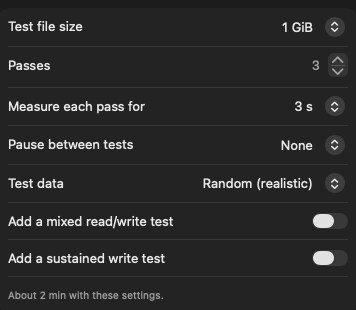
Click Options and check that the test file size is 1 GiB. Bigger files take longer without changing much on a modern SSD. Smaller files can fit in the drive’s cache and look faster than they are.
Step 4: Plug external drives straight into the Mac
Use the cable that came with the drive, in a port on the Mac itself. Hubs and long or cheap cables are a common cause of slow results. oDisk shows the link speed in the drive’s header and warns you when a fast SSD is connected at a slow USB speed.
Step 5: Run the test
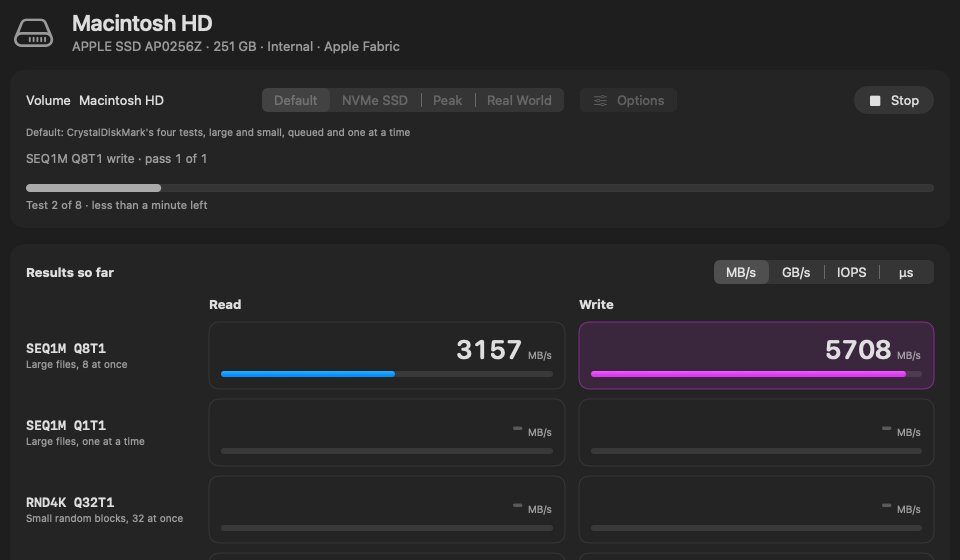
Click Run Test (or press ⌘R). The cell being measured lights up, and a progress bar shows which test is running and about how long is left. oDisk writes a temporary file and deletes it when the test ends.
Step 6: Run it twice and compare
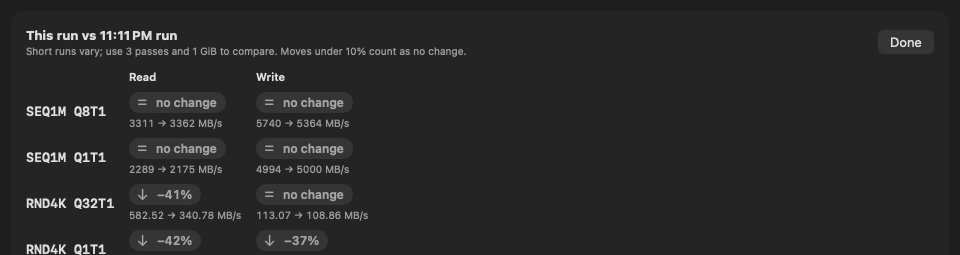
Run the test again, then choose Compare with Previous Run under History. If the two runs differ by more than about 10%, something else was probably using the drive.
Read the results
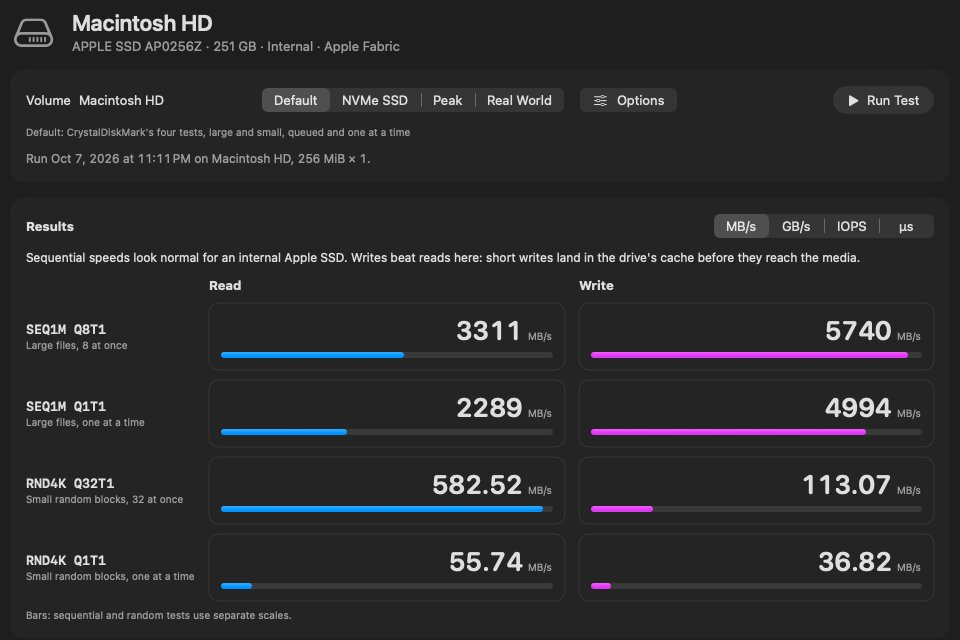
| Test | What it measures | What matters |
|---|---|---|
| SEQ1M Q8T1 | Large files, 8 requests at once | The headline number on the box. Good for comparing drives and checking a cable. |
| SEQ1M Q1T1 | Large files, one at a time | Closer to copying a single big file. |
| RND4K Q32T1 | Small random blocks, 32 at once | Heavy multitasking and servers. |
| RND4K Q1T1 | Small random blocks, one at a time | How snappy the drive feels opening apps and files. Low on every drive, so compare it with similar drives rather than with SEQ. |
Rough figures for healthy drives (MB/s, read / write, SEQ1M Q8T1):
- Apple Silicon internal SSD: about 1,500 to 7,000, depending on the model and capacity. 256 GB base models are at the low end; an M4 Mac mini with 256 GB reads about 3,100.
- External NVMe over USB 10 Gb/s (such as a Samsung T7): about 1,000 / 1,000.
- Over USB 5 Gb/s: about 450.
- Over USB 2 (a wrong cable or port): about 40. If you see this, change the cable before blaming the drive.
Why an external SSD slows down on long copies
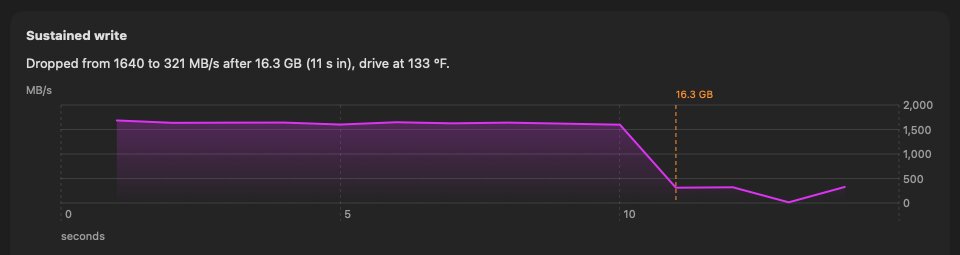
Many portable SSDs write fast until a cache fills or the drive gets hot, and then drop sharply. You’ll see this as a copy that starts at 1,000 MB/s and falls to a few hundred, or lower. A short benchmark won’t show it, because it finishes before the cache fills.
To check, run a sustained write test of a minute or two and watch the speed and the drive temperature over time. oDisk has one (Speed Test › Options › Add a sustained write test). It reports where the speed dropped and how hot the drive was at that point. If the drop comes with high temperatures, better airflow helps. If it happens on a cool drive, it’s the cache, and that’s how that drive is built.
Common questions
Why is my Mac’s random 4K speed so much lower than sequential?
That’s normal for every SSD. Small random reads can’t be grouped into big efficient transfers. Compare RND4K numbers with other drives, not with SEQ.
Why are my results different from the box?
Box figures are best-case SEQ results, often on a faster PC port. Within about 10 to 15% of the box is normal.
Does a disk speed test wear out my SSD?
A standard run writes a few gigabytes, which is tiny against the hundreds of terabytes most SSDs are rated for. A long sustained write test writes more, so don’t run it every day.
Can I trust a CrystalDiskMark result from Windows in Parallels?
No. It measures the virtual disk, not your Mac’s drive.
Tools
- oDisk (my app): speed tests and drive health in one Mac app, with a sustained write test and run history. oDisk isn’t affiliated with Crystal Dew World, the maker of CrystalDiskMark.
- AmorphousDiskMark: free, speed test only, no drive health.
- Blackmagic Disk Speed Test: free, large-file speed only.
Related: CrystalDiskMark and CrystalDiskInfo for Mac and what the SSD health numbers mean.
../mac/ every Mac guide