Use Cloudflare Tunnel to reach home services behind CGNAT
gist Cloudflare documents an outbound connection model. A working setup still needs account credentials, a reachable origin, hostname routing, and access checks.
You stopped about in. Jump back
contents
Cloudflare Tunnel can provide a path to home web services behind CGNAT. Cloudflare documents that its cloudflared connector initiates outbound connections, so the tunnel does not require a publicly routable home IP or inbound router forwarding. A working route still needs valid tunnel credentials, a connected connector, and a reachable home service. Cloudflare Tunnel documentation
I run cloudflared in Docker on my Unraid box.
Step 1: Check the connector
cloudflared is the connector program. A running container alone does not show whether it has connected to Cloudflare.
These commands show its installed version and tunnel options:
cloudflared --version
cloudflared tunnel --help
For the published web hostname described here, Cloudflare lists three prerequisites: a Cloudflare account, a domain on Cloudflare, and a connector host with internet access. Follow the official setup instructions to create the tunnel and configure its connector.
Choose the service address from the connector’s network. Docker documents that containers have their own networking, though some configurations share a network stack. With a separate network namespace, 127.0.0.1 points to the connector container itself. It does not point to another application container or the host. Docker networking documentation
If the app runs in another container, check whether both containers share a suitable Docker network and whether the app listens on an address reachable there. Verify the service responds from the connector’s network before relying on that address.
Step 2: Understand the outbound connection
With CGNAT, the provider controls an upstream address-sharing layer. A rule on your home router cannot configure that layer. An outbound tunnel avoids needing that inbound route, provided the connector can connect out.
Cloudflare describes two parts of the path:
- Connection setup: home connector → Cloudflare edge.
- Web request after connection: visitor → Cloudflare edge → tunnel → connector → home service.
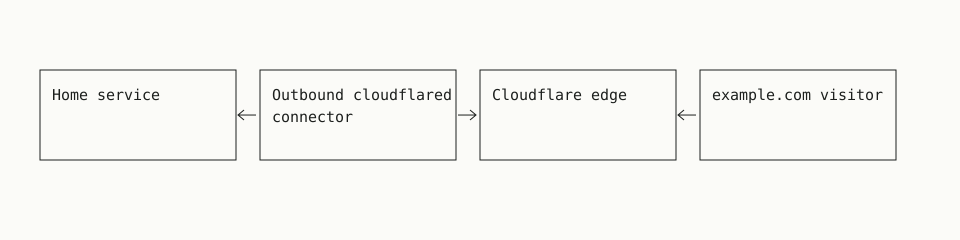
Traffic flows both ways through the connection initiated by the connector. How Cloudflare Tunnel works
Tunnel traffic uses outbound port 7844, with UDP for QUIC or TCP for HTTP/2. A restrictive firewall must allow the documented destinations. An inbound router rule for that port is unnecessary for this connection model. Tunnel firewall requirements
Routing and visitor authentication need separate configuration. For a private web app, Cloudflare recommends creating an Access application before publishing the tunnel route. Its instructions cover Allow policies and Access token validation through cloudflared or the origin application. Keep the app’s own authentication enabled too. Publish and protect a self-hosted application
Check both allowed and denied access in your deployment before treating the route as private.
Step 3: Map a hostname to your service
A published application route maps a public hostname to a service URL that the connector must be able to reach.
For a dashboard-managed tunnel, follow Cloudflare’s published application setup. Choose the intended hostname and enter the service’s protocol, address, and port. Adding the route does not prove the service responds.
For a locally managed tunnel, ingress rules define the mapping. This illustrative fragment uses a controlled demo upstream at loopback port 8080:
ingress:
  - hostname: app.example.com
    service: http://127.0.0.1:8080
  - service: http_status:404
The loopback URL only works for a service in the connector’s own network namespace.
This fragment omits the tunnel identity and credentials needed for a complete local configuration. Cloudflare documents that ingress rules are checked from top to bottom and must end with a catch-all rule. Here, unmatched requests receive 404. Local configuration documentation
For an existing local configuration, Cloudflare documents these checks:
cloudflared tunnel ingress validate
cloudflared tunnel ingress rule https://app.example.com
The first checks ingress validity. The second shows which rule matches the URL. Neither proves account authentication, DNS routing, or an upstream response.
For your deployment, verify each part separately:
- Check that the service responds from the connector’s network.
- Check that Cloudflare reports a connected connector.
- Check that the public hostname returns the intended app from outside your home network.
- Check that an allowed visitor can authenticate.
- Check that an unauthorized visitor cannot read private content.
Cloudflare documents error 1033 as having no healthy connector available. A tunnel 502 with an origin-unreachable message means the tunnel is connected but the configured service cannot be reached. Check its address, port, protocol, and availability. Tunnel troubleshooting
An Access login screen alone does not prove that the origin works. Authentication and origin routing are separate parts of the request path.
cloudflared tunnel --config /etc/cloudflared/config.yml ingress rule https://app.example.com
Using rules from /etc/cloudflared/config.yml
Matched rule #0
	hostname: app.example.com
	service: http://127.0.0.1:8080
Rule 0 sends this hostname to port 8080; check that it is the intended origin.
Compare the alternatives
Choose based on who needs access, which clients they use, and how much infrastructure you want to maintain.
| Option | Good fit | What to check or manage |
|---|---|---|
| Cloudflare Tunnel | Web apps reached through a public hostname | Connector credentials, service routing, authentication, and dependence on Cloudflare |
| Tailscale private networking | Access from devices you can enroll | Client setup, access rules, and whether connections use a relay |
| WireGuard through a VPS | Private access or a public proxy you manage | VPS costs, updates, keys, firewall rules, routing, and proxy configuration |
| ISP-provided public address | Direct inbound access | Availability, inbound filtering, router rules, DNS, and app security |
Tailscale attempts direct connections and can use peer or DERP relays when a direct path is unavailable. Relayed connections may have lower throughput and higher latency. This makes connection type worth checking for your workload. Tailscale connection types
A VPS design gives the home WireGuard peer a reachable endpoint. You must also configure forwarding or a reverse proxy for the intended traffic. WireGuard documents persistent keepalives for maintaining a NAT mapping while idle. They do not assign a public address to your home connection. WireGuard quick start
Before paying for an ISP address, ask whether it permits the inbound connections you need. A public address can change; a static address stays fixed. Neither description alone confirms the provider’s filtering rules.
Common questions
What are the downsides to tunneling?
Requests depend on your home service, connector, internet connection, and Cloudflare being available. The documented web request path passes through Cloudflare’s network, which adds a provider dependency. Cloudflare Tunnel architecture
Access can also affect client compatibility. Cloudflare documents that protected requests need its authorization cookie. An app’s own login therefore does not, by itself, satisfy Access authentication. Check whether your native or automated client supports the chosen authentication method. I wrote up how to work through that in Cloudflare Access failures in native apps. Access authorization cookies
Are there better alternatives?
For private access from enrolled devices, consider Tailscale. For a public web hostname without a separate proxy server, consider Cloudflare Tunnel. For control over the reachable endpoint and proxy, consider a VPS with WireGuard.
Compare client support, relay performance, provider dependence, and maintenance. There is no single best choice for every service.
Is port forwarding the way to go if I do not have a static IP?
A static IP is not required. If you have a changing public address that accepts inbound traffic, dynamic DNS can update the hostname when that address changes. Dynamic DNS documentation
CGNAT is a routing problem. Updating a DNS record cannot configure the provider’s upstream NAT. Ask your ISP whether an inbound-capable public address is available, or choose an outbound tunnel or private networking tool.
What would be another secure and private way to publish self-hosted services?
For access limited to enrolled devices, use private networking with access rules. For a public website, a VPS with a reverse proxy and a WireGuard path home is another design.
Both need authentication and careful routing. A tunnel transports requests; verify who can reach the app and what they can read. For Cloudflare Access, follow the documented token validation steps and test denied access as well as successful login. Access setup and token validation
Related: browse self-hosting guides and the full guide index.
../self-hosting/ every Self-hosting guide